AWS Marketplace
Yobitel Multi-Model Text-to-Image Inference Server
The Yobitel Multi-Model Text-to-Image Inference Server is a fully pre-configured, GPU-accelerated AMI designed for AI researchers, artists, and developers who need cutting-edge text-to-image generation and visual synthesis on AWS.This AMI integrates multiple diffusion-based mo...
The Yobitel Multi-Model Text-to-Image Inference Server is a fully pre-configured, GPU-accelerated AMI designed for AI researchers, artists, and developers who need cutting-edge text-to-image generation and visual synthesis on AWS.This AMI integrates multiple diffusion-based models such as Stable Diffusion 3.5-Medium, FLUX.1-dev, and SDXL-Lightning. These are all pre-loaded and optimised for high-performance GPU inference.
Setting up a multi-model inference environment can be complex due to dependencies like CUDA, PyTorch, and container configurations. The Yobitel AMI simplifies this by providing a production-ready solution so users can start generating images immediately through a browser-based Gradio interface.
Key Features
- Pre-installed AI Models: Stable Diffusion 3.5-Medium – High-fidelity, realistic text-to-image generation.FLUX.1-dev – Advanced diffusion model enabling creative and design-driven visual outputs.SDXL-Lightning – Optimised for lightweight, high-speed inference and rapid Prototyping
- GPU-Accelerated Inference: Integrated with NVIDIA GPU drivers, CUDA Toolkit, and PyTorch for seamless hardware acceleration and real-time image generation.
- Unified Web Interface: Each model is deployed in a dedicated Docker container and accessible via a Gradio web interface, allowing users to perform inference directly through their browser.
- Customizable & Scalable: Built on an open-source foundation, enabling model fine-tuning, container modification, and scalable deployment across AWS GPU instances.
- Secure & Flexible Configuration: No embedded credentials or SSH keys. One-time password authentication and isolated containerised architecture ensure a secure and controlled environment.
- Comprehensive Documentation: Step-by-step instructions provided for deployment, accessing the web interface, model selection, and customisation.
Technical Usage Manual
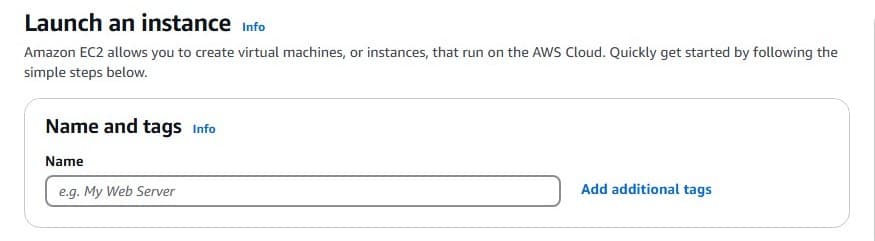
- Once you subscribe to the AMI for Yobitel Multi-Model Text-to-Image Inference Server Model from the AWS Marketplace, choose the launch through EC2 and launch.
- It redirects to the launch instance page, configures the required details, i.e., Name, Instance type, Keypair, Network Setting, Storage, and launches the Instance.
- Choose the Instance type as per your requirements.
- When the instance is successfully created, go to the EC2 Dashboard in the AWS Console, select your created instance, and copy the public IP of the instance.
- After launching the instance, place the public IP in your terminal .
- It Displays Three models in the terminal, you can choose one that you want.
- You can choose the model that you want by entering the option number.
- It takes some time to launch the model. Once it launches, it will show the port .
- Before placing the public IP in the browser, make sure that your AWS instance security port is open for 7861,7862, and 7863 ports.
- Use the obtained public IP address from the created instance (Ex, 38.84.57.81).
- For Each Model, we have different ports like (http://:7862) for Stable Diffusion 3.5 (Model1), (http://:7861) for FLUX.1 (Model 2 ) , (http://:7863) for SDXL Model (Model 3)
- Open a web browser. Navigate to: (http://:7862). Replace your instance's public IP in ().
- Now the Selected Model will be launched in your browser.
- If you prefer, you can also preload your desired model using our configuration file and intuitive web interface.
- The user can launch one model at a time.
Insights & Support
- We will do our best to respond to your questions within the next 24 hours in business days. For any technical support or queries, please contact our Support.
- Please check out our other Containerised Cloud-Native application stacks, such as Blender 3D GPU rendering, Paraview 3D Solutions, GPT-OSS-20B and AMI - Amazon Machine Images- in the AWS Marketplace.
Ship this in production
Multi-Model Text-to-Image Inference Server
One-click deploy into your own AWS account. Your data never leaves your VPC. Billed through your existing AWS account — no separate Yobitel subscription, no procurement overhead.